

Nobody talks about the seat.
They talk about the wheelbase. They talk about the pedals. They agonize over screens and debate motion platforms and compare rim diameters. Then they sit in whatever seat was bundled with their chassis, adjust it "close enough," and start driving.
And they wonder why their back hurts after 40 minutes. Or why they feel disconnected from the car. Or why their braking consistency drifts across a long stint.
The seat is the interface between your body and every piece of feedback the rig produces. It's where force feedback vibrations reach your torso. It's where the pedal pressure connects through your hips and spine. It's how your body stabilizes during aggressive steering inputs. And it's the thing that determines whether you can actually sit in the rig long enough to get better.
Getting it right matters more than you think.
What the Seat Actually Does in a Simulator
In a real race car, the seat does several critical jobs: it holds you in place against g forces, transmits chassis vibrations to your body, and positions you correctly relative to the controls. The first job is the reason racing seats have aggressive bolsters and harness slots.
In a simulator without a motion platform, lateral and longitudinal g forces don't exist. Your body doesn't need to be physically restrained. That changes the calculus entirely.
In a sim rig, the seat's primary jobs are:
Positioning. The seat determines your hip point, which is the reference from which every other ergonomic dimension is measured. Your distance to the pedals, your height relative to the wheel, your sight line to the screens, all of these flow from where your hips sit.
Comfort over time. Because you're not fighting g forces, the aggressive side bolsters that make a GT racing seat feel secure in a real car can actually work against you in a simulator. They can restrict your movement, create pressure points against your ribs, and become uncomfortable far sooner than a less aggressive seat would.
Vibration transmission. If your rig transmits force feedback vibrations through the chassis (and most direct drive setups do), the seat is the pathway those vibrations reach your body. A seat that's rigidly bolted to a stiff chassis frame transmits more tactile information than one that's mounted on rubber bushings or cushioned away from the frame.
Stability during inputs. When you turn the wheel or brake hard, your body naturally shifts. A seat that lets you slide around makes your inputs less precise because you're compensating for body movement instead of focusing purely on the controls.
Seat Types and Their Tradeoffs
Fixed Back Racing Bucket Seats
These are the seats most people picture when they think "sim racing." They look aggressive, they mount securely, and they feel like you're sitting in a race car.
Advantages. Rigid one piece construction provides excellent vibration transmission. Side bolsters hold you in position during steering inputs. The racing aesthetic is undeniable. Many are available in fiberglass or composite construction, which makes them lightweight and extremely rigid.
Disadvantages. Comfort varies enormously by brand, model, and how well the seat's shape matches your body. A seat designed for a 160 pound endurance driver is going to be miserable for a 220 pound person. The aggressive bolsters that feel snug for the first 30 minutes can become painful pressure points after two hours. Many bucket seats have minimal or no lumbar support, which creates lower back fatigue on longer sessions.
Best for. Drivers who prioritize rigidity, vibration feedback, and a race car feel. Drivers who run primarily shorter sessions (under 90 minutes). Drivers who have tested the specific seat and confirmed it fits their body well.
Reclining Sports Seats
A middle ground between a full bucket and an office chair. These seats have moderate bolstering, an adjustable recline angle, and often include some padding and lumbar support features.
Advantages. More comfortable for a wider range of body types. The recline adjustment lets you fine tune your back angle to reduce fatigue. More padding means less pressure point discomfort on long sessions. They typically fit a broader range of body sizes without the "too tight or too loose" problem of fixed buckets.
Disadvantages. Less rigid than a one piece bucket, which means slightly less vibration transmission. The reclining mechanism adds a potential flex point that can feel vague if the seat quality is low. The aesthetic is less "race car" than a full bucket, which matters to some people.
Best for. Endurance racers who need to stay comfortable for hours. Drivers who share their rig with family members of different sizes. Anyone who values sustained comfort over aggressive aesthetics.
Office and Gaming Chairs (With Wheel Stands)
If you're using a wheel stand or a compact foldable rig, you might be using your existing desk chair or a gaming chair as your seat.
Advantages. No additional cost if you already own the chair. Easily removable if the space needs to serve other purposes. Some high end gaming chairs have decent ergonomics.
Disadvantages. Wheels on the base allow the chair to roll backward under heavy braking, which is both frustrating and dangerous. Most office and gaming chairs lack the bolstering needed to keep you stable during aggressive driving. Vibration transmission is essentially zero because the chair is separate from the rig chassis.
Best for. Absolute budget builds. Temporary setups. Situations where the rig must be completely removable between sessions. Not recommended for anyone serious about the driving experience.
Karting Seats
An unconventional but effective choice, particularly for younger drivers or compact rigs. Karting seats are lightweight, low profile, and designed to position the driver close to the floor.
Advantages. Available in sizes specifically designed for children and smaller adults. Very lightweight. Low mounting height keeps the rig's center of gravity down, which is relevant for motion platforms. Inexpensive compared to automotive racing seats.
Disadvantages. Minimal padding means they're uncomfortable for long sessions. Limited lumbar support. The seating position is very upright, which may not match the cockpit feel of the car class you're simulating.
Best for. Young kart racers who need a seat that fits their body. Compact rig builds where seat height is a constraint.
The Seating Position: Getting It Right
The seat itself is only half the equation. Where and how it's positioned relative to the wheel, pedals, and screens determines whether the ergonomics work.
Hip Point and Back Angle
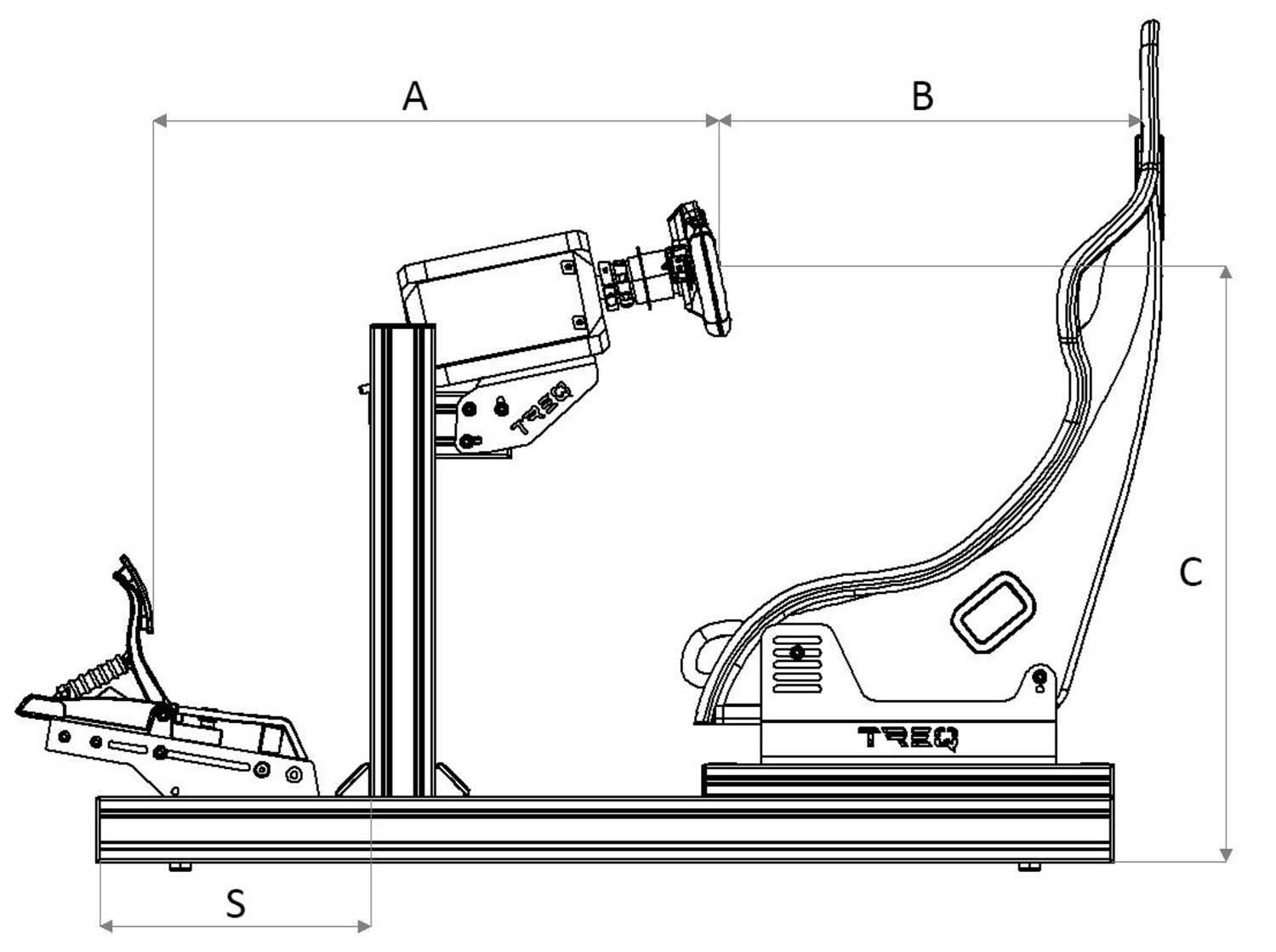
Your hip point (where your pelvis meets the seat base) is the anchor for everything else. From this point, your legs extend forward to the pedals and your arms extend forward to the wheel.
The back angle should put your spine in a supported, comfortable position. For most people, that's between 15 and 25 degrees from vertical. Too upright and your lower back takes all the load. Too reclined and your neck has to crane forward to see the screens, which creates neck fatigue.
A useful test: sit in the seat at your chosen angle and let your arms hang naturally at your sides. Then raise them to the wheel position. If your shoulders have to lift significantly to reach the wheel, either the wheel is too high or the seat is reclined too far.
Pedal Distance and Height
Your legs should be slightly bent when the pedals are at their resting position. Fully extended legs mean the pedals are too far away, which causes calf and hip flexor fatigue on long sessions. Overly bent legs mean the pedals are too close, which reduces your ability to modulate pressure with fine control.
The pedal plate angle matters too. Most dedicated sim chassis allow you to adjust the angle of the pedal plate to simulate different mounting positions. A more vertical pedal angle mimics a GT or formula car, where you push the brake more forward than downward. A more horizontal angle mimics a road car, where you press downward. Match the angle to the type of racing you primarily do.
Wheel Height and Distance
The center of the steering wheel should be roughly aligned with your chest, not your face. Reaching up to the wheel causes shoulder fatigue. Reaching forward to the wheel causes upper back and neck strain.
Your elbows should be bent at roughly 90 to 120 degrees when holding the wheel at 9 and 3. If your elbows are straight, the wheel is too far away. If your elbows are tucked against your ribs, it's too close.
Screen Distance and Height
Your primary screen (or the center screen in a triple setup) should be positioned so the top edge of the screen is approximately at or slightly above eye level. This means you're looking straight ahead or very slightly downward, which is the most natural resting position for your eyes.
Screen distance affects FOV calculations and perceived immersion, but from a comfort perspective, the key is that you shouldn't be craning your neck up, down, or forward to see the road ahead. If you find yourself leaning forward to see braking references, the screen is too far away or your FOV is incorrect.
The Adjustment Process
Here's a practical sequence for dialing in your seating position:
Step one. Set the seat back angle to roughly 20 degrees from vertical. This is a starting point you'll refine later.
Step two. Position the pedals so your legs are comfortably bent with your feet resting on the pedal faces. Check that you can apply full brake pressure without your leg fully extending.
Step three. Position the wheel so your arms are comfortably bent with your hands at 9 and 3. Check that you can turn the wheel to full lock without your shoulders lifting off the seat back.
Step four. Position your primary screen so the top edge is at eye level and the distance feels natural.
Step five. Drive 20 laps. Pay attention to where fatigue or discomfort develops. Sore neck? Screen might be too high or too low. Sore shoulders? Wheel might be too high or too far. Lower back pain? Seat angle needs adjustment or you need better lumbar support.
Step six. Make one adjustment at a time. Drive another 20 laps. Repeat until nothing hurts.
This process takes time, but every minute invested here pays off across every future session. A position that's "good enough" will haunt you every time you sit down for a long stint.
One Final Point
The best seat is one that disappears. When you're driving and all you think about is the car, the track, and the next braking zone, your seat is doing its job. The moment you notice the seat, whether it's a pressure point, a sore back, or a bolster digging into your ribs, it's working against you.
Don't settle for a seat that you're constantly aware of. Find one that fits your body, supports your driving style, and lets you focus on the only thing that matters: driving.
RRG Racing matches every build with the right seat for the driver's body, their racing discipline, and their typical session length. Because we know that the best rig in the world doesn't matter if the seat drives you out of it. Based at Atlanta Motorsports Park in Dawsonville, Georgia. Visit rrgracing.com to build a rig that fits you.
Share:
Assetto Corsa vs iRacing: Choosing the Right Platform for Your Goals
Can Sim Racing Actually Make You Faster on a Real Track?